This is announcement

Hot Folder

Speed up your workflow with our hot folder solution

Introducing hot folder

Introducing QuickServer, hot folder solution

Set it and forget it! QuickServer harnesses our patented Perfectly Clear technology in a hot folder solution. This fully-automated photo correction software for Windows & Mac pairs with our QuickDesk interface so you can design presets and automatically process tens of thousands of images.

Easily implemented
dp2, ROES, and more

Perfectly Clear QuickServer is a hot folder solution that runs on your backend server. To set it up, simply run our automated installer. It integrates with many major workflows, too!

Speed at high volumes

QuickServer tirelessly and automatically corrects thousands of photos per hour, making it the most robust automatic softwares for image editing and processing.

Set and forget​

Like any server, QuickServer is a tool you set up once and leave to run. Its stable software, fail-safe protection, and proven automatic image correction keep everything working—even with rogue or unsupported images—so you can focus on other priorities.

Who is QuickServer for?

QuickServer is for labs and photo processors who need the highest level of automation, while still demanding great image quality. QuickServer is typically setup once, then it silently runs on a server, processing perhaps 100,000 per day.
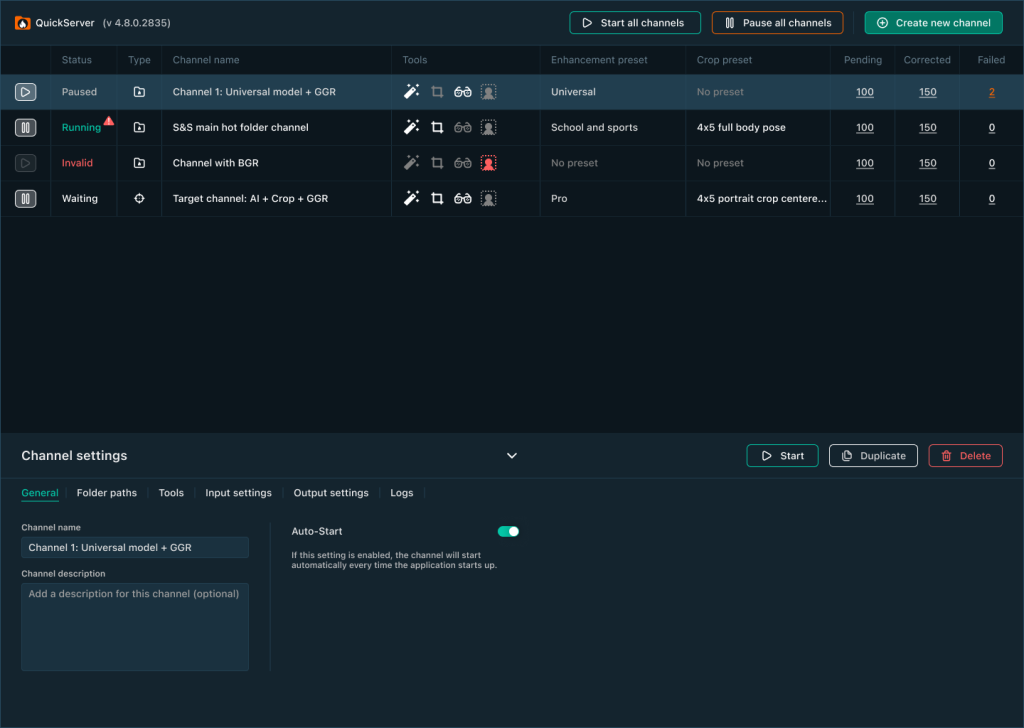
QuickServer user interface dashboard

Create the presets you’d like to use in Workbench, then let QuickServer get to work.

Raw File Support

Raw files are supported so any job can be run through

Visual log monitoring

Help spot issues quickly through visual log monitoring

Target channels

Explore options with batch processing and save all images automatically without viewing

Reliable image processing. Effortless control.

As well as being a powerful stand-alone image processing application, Perfectly Clear's Workbench, image quality testing tool and custom preset creation tool, can act as a front-end interface to QuickServer, to provide the following benefits:

1.

Create Custom Presets

2.

Visual image preview

3.

Allow for manual tweaking and approval on difficult images

4.

QuickServer supports DP2, ROES, 36Pix, and more to integrate seamlessly into your current workflow

Perfectly Clear QuickServer and Workbench were designed to work seamlessly together. Start with Workbench as your visual on-boarding tool to immediately preview the results of Perfectly Clear image adjustments — in real-time! You’ll also use Workbench to create custom presets, these presets immediately appear within QuickServer.


Seen here is a 19 year old young lady sitting for her High School Senior portrait wearing a traditional simple black drape and pearls. Head straight.See other related images here:
Before
After
Seen here is a 19 year old young lady sitting for her High School Senior portrait wearing a traditional simple black drape and pearls. Head straight.See other related images here:Seen here is a 19 year old young lady sitting for her High School Senior portrait wearing a traditional simple black drape and pearls. Head straight.See other related images here:

Test out our image quality for yourself

Are you ready to see Perfectly Clear in action? Try it for free for 30 days with Perfectly Clear Workbench! This Windows & Mac stand-alone software allows you to see our automatic image corrections in real time, tweak them, and create custom presets for your implementation.

Start free trial

Ready to start implementing?

Not the solution you’re looking for?

Explore our other solutions